Gear for Earnings Calls and Trading Podcasts
Consider earbuds, an e-reader and a power-bank case for a more organised listening and reading workflow.
A cleaner trading workspace is less about building a battlestation and more about reducing everyday friction. Four accessories, four specific desk problems, and a price tally you fill in yourself.
Good desk gear should remove small sources of friction: a tablet that is hard to see, cables that get in the way, a device accessory that does not fit, or files that are difficult to organise. You do not need a room full of equipment to make a workspace more functional.
This guide focuses on four modest upgrades. We have no verified live prices, so we cannot responsibly promise that the complete setup costs under a particular amount. Use the tally below with today's Amazon prices to see your own total before you decide.
Jump to a pick
| Pick | Solves | Check this first | Listing |
|---|---|---|---|
| Lamicall Adjustable iPad Stand | A tablet lying flat beside the keyboard | That the stand fits your tablet's dimensions and thickness | View (affiliate link, opens in a new tab) |
| Delamu Cable Concealer Raceway Kit | Loose leads crossing the work area | The kit's dimensions and what is included | View (affiliate link, opens in a new tab) |
| Silicone Case for an Anker Laptop Power Bank | Protecting a power bank you already own | The supported model number in the listing | View (affiliate link, opens in a new tab) |
| SanDisk 128GB microSD Card | Scattered screenshots, exports and journal copies | The card format and speed class your device needs | View (affiliate link, opens in a new tab) |

A tablet can be useful for a watchlist, calendar, research notes or a secondary information panel while your main computer handles charting. A stand raises the tablet from the desk and lets you set a viewing angle, which is more practical than leaving it flat beside the keyboard.
Treat it as a low-cost way to organise a second device, not as a substitute for a monitor if you need a larger display.
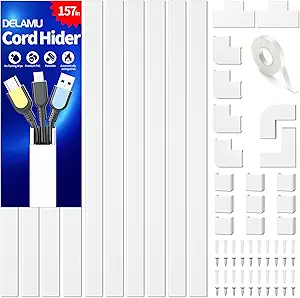
Cable clutter is easy to overlook until a charging lead catches on a chair, crosses the work area or makes it difficult to move a device. Cable raceways can route compatible cables along a desk edge or wall and make the workspace easier to clean.
Adhesive performance depends on the surface, cable load and preparation, so follow the manufacturer's instructions rather than assuming every wall or desk finish is suitable.

This is a protective accessory, not a power bank.
Its usefulness depends entirely on whether it matches the exact Anker model you own. If you need backup power, choose a compatible power bank separately and verify that its output supports your laptop.
A case by itself will not provide power or protect against every type of damage.

A removable memory card can store screenshots, exported charts, recordings or copies of a trading journal when your device supports microSD storage. It can also make it easier to move files between compatible devices.
A memory card is not a complete backup strategy. Keep a second copy of important journals and files somewhere separate.
We don't show prices, because they change. Open each listing, type today's price below in your own currency, and see your real total. Leave out anything you don't need.
Equipment can make a workspace easier to use, but it cannot create a trading edge on its own. Pair a functional setup with a repeatable method and disciplined risk management.
The harder work is the method behind each trade. Trade Stocks Like A.I. walks through a structured approach to technical indicators and trading decisions.
Consider earbuds, an e-reader and a power-bank case for a more organised listening and reading workflow.
Compare seating, movement options, optional tracking and the computer you already own.
Editorial note: product descriptions here are based on the supplied product names and listings, not independent laboratory testing or hands-on review. We do not claim that any item improves trading performance or profitability. This page is for general information and is not financial advice.